Ask for it in your own words and watch Romy build it in Salesforce

Romy is a chat with a real browser beside it. Tell it what your business needs. It builds it in your Salesforce, tries it like your team would, and tells you what it did in words you understand. Every change has its own Undo.

New chat
Ask anything, or describe what you want…
Builds right away 96% left
Browser Plan Files
All Jobs | Jobs | Salesforce
summit.lightning.force.com/lightning/o/Job__c/list
PointClick the page to use it
Search…
MR
SummitHomeJobsCustomersReports
J

Jobs

All Jobs

NewImport
7 items · Sorted by Job # · Updated a few seconds ago
Job #CustomerWorkStatus
J-1042Maria LopezWater heater installBooked
J-1041The HendersonsFurnace tune-upIn progress
J-1039Alder St DentalLeak under sinkScheduled
J-1038Kim NguyenAC not coolingScheduled
J-1036Bend BakeryGrease trap cleanDone
J-1035Paul MarshThermostat swapBooked
J-1033Riverside HOABoiler checkDone
What you're seeing: Summit Home Services gives out jobs on a whiteboard. Maya pastes the spreadsheet they book jobs on, drops in a photo of the whiteboard and asks for a board in Salesforce. Romy builds a Job Board with a column for each tech, tries it once by dragging a job onto Sam, and the office gives out jobs in Salesforce from then on.

One sentence in

“Make our whiteboard a board in Salesforce.” No forms, no Salesforce words. Paste the spreadsheet you use now or drop in a photo if it helps.

A working thing out

Built in your Salesforce, then tried once on a real record in the browser beside the chat, while you watch every click. Then your team uses it.

Told in plain words

What it built, what it checked and what it noticed, with Show me and Undo on each change.

The best of it, at a glance each one has its own page

Pieces of the app as it looks, a few of them moving. Pick any one to see how it works.

Emails in your own look

New
Ask for an email, like a thank-you after each job. Romy looks through your website for your logo, colours and words, builds the email in Salesforce, and shows you how it looks on a computer and on a phone.

A real browser, right beside the chat most AI tells you where to click. Romy clicks

It opens your Salesforce in a browser next to the chat and works in it the way your team would. Ask how something works and it opens the page and points at the answer.
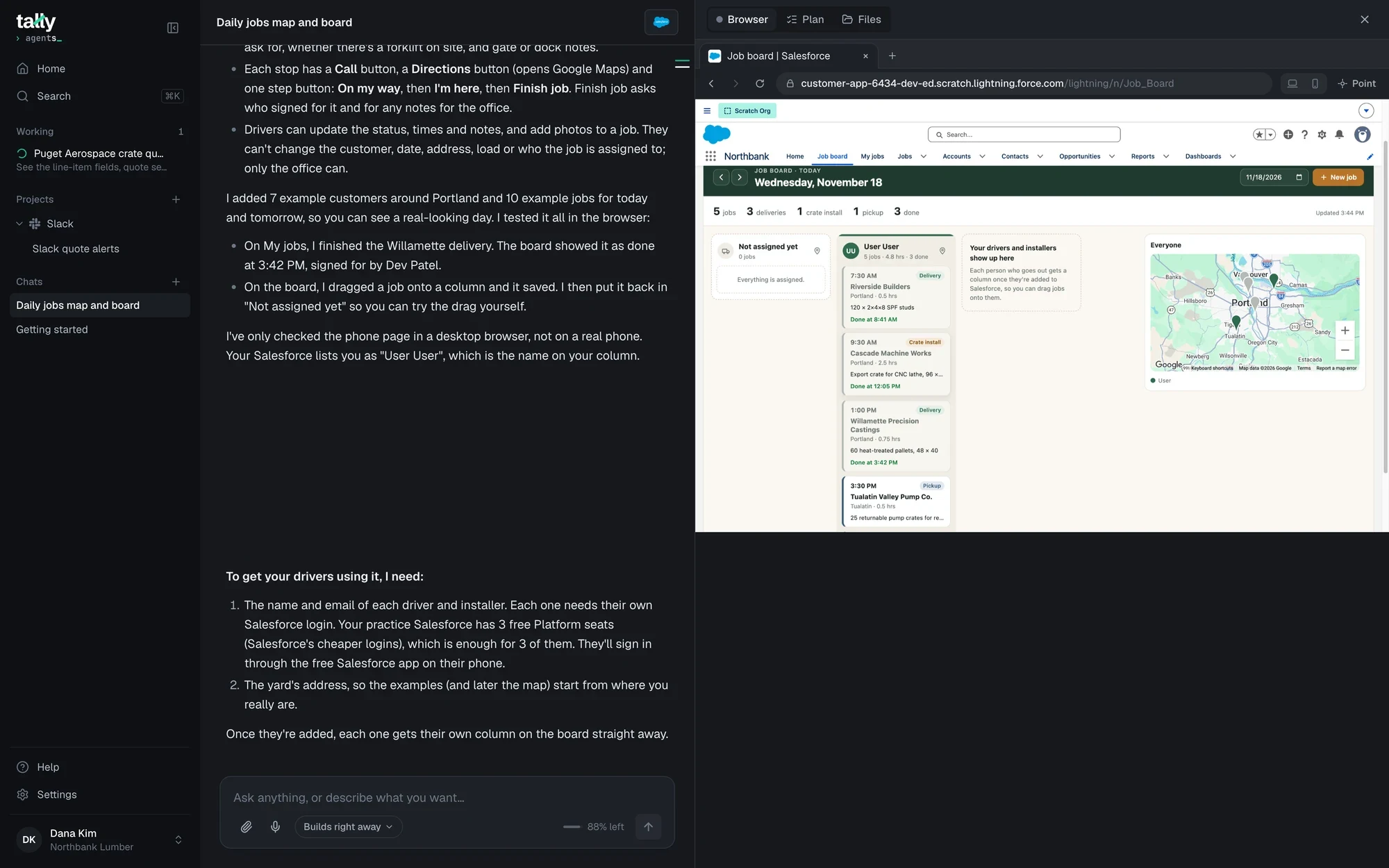
Romy's browser open on the Job board it built in Salesforce: Wednesday, November 18, 5 jobs, a Not assigned yet column, a column for the driver with timed deliveries and pickups, and a map.

From a real chat in Romy. Dana asked for a job board for Northbank's drivers and installers. Romy built it, then tried it in its browser: it finished a delivery on the phone page and dragged a job onto a column to check it saved, before saying it was done.

How it works in the browser

  1. Opens the real page

    Your Salesforce as your team sees it: your app, your tabs, your records. Or any other website the job needs.

  2. Does it like a person would

    It clicks, types and scrolls with its own pointer, and the bar says what it's doing. Nothing happens behind a curtain.

  3. Hands you the page when it's yours

    A sign-in, a code from your email, a choice only you can make. It says so on the page and waits.

  4. Checks the result

    It tries what it built on a real or test record and reads the answer before it says it's done.

  5. Tells you, with Undo

    Then it answers in plain words, and every change gets a card with Show me and its own Undo.

Take over whenever you want and hand it back with Done

Passwords stay yours. On a sign-in page Romy hands you the page and waits. Press Take over, sign in, press Done, and Romy carries on from where you left it.
QuickBooks/Connect QuickBooks
Connect QuickBooks so every finished job becomes an invoice.
First I'll get you signed in to QuickBooks.
Opening QuickBooks
Ask anything, or describe what you want…
Builds right away 96% left
Browser Plan Files
Sign in to QuickBooks
Jobs | Salesforce
accounts.intuit.com/app/sign-in
PointRomy is working · Opening QuickBooksTake over
intuit

Sign in

One account for everything Intuit, including QuickBooks. Learn more

Email or user ID

Remember me

Sign in
or
G Sign in with Google

New to Intuit? Create an account

What you're seeing: Summit Home Services asks Romy to connect QuickBooks. Intuit's sign-in comes up and the bar says “Sign in here yourself”. Maya presses Take over, signs in, presses Done, and Romy connects it and carries on in Salesforce.
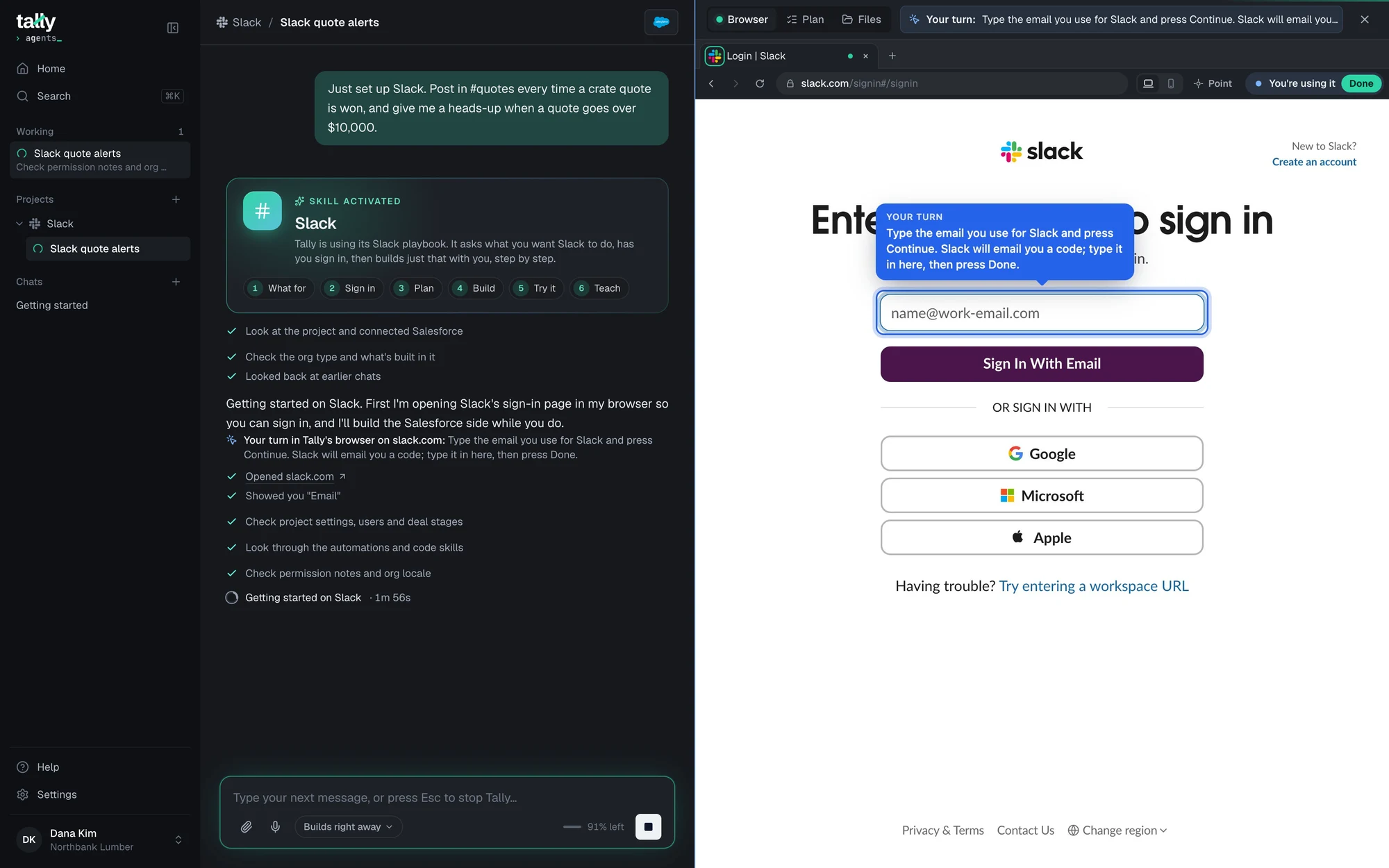
Romy's browser on Slack's sign-in page: the bar says Your turn, type the email you use for Slack, a blue Your turn bubble sits over the email box, and the address bar says You're using it, with Done.

The same thing, in a real chat

Dana asked Romy to set up Slack alerts. Romy opened Slack's sign-in and put a Your turn note right on the email box, then built the Salesforce side while Dana signed in.

  • The bar says You're using it, with Done to hand it back
  • The chat says what's needed from you, in one line
  • Its browser keeps its sign-ins, so you don't sign in every time

Point at what you mean and skip the explaining

Press Point and click anything on the page. Romy gets a picture of it and knows exactly which field or button you mean, so “make this required” is all you need to say.

  • Click a field, a button or a whole section
  • Or press Draw instead and circle it
  • Or hold ⌥ Option and click, no button needed
Job board for the office
Built the Job board · 34 steps
It's a new Job Board tab, with a column for each tech like your whiteboard and one for jobs nobody has yet. I tried it by dragging Maria Lopez's water heater install onto Sam, and it saved.
Ask anything, or describe what you want…
Builds right away 96% left
Browser Plan Files
Job Board | Salesforce
All Jobs | Jobs | Salesforce
summit.lightning.force.com/lightning/n/Job_Board
PointClick the page to use it
Search…
MR
SummitHomeJobsJob BoardCustomersReports

Job board

Thursday, November 19

11/19/2026 New job
8 jobs1 not assigned3 techsDrag a job onto a tech to give it to them

Not assigned yet

1 job

2:30 PMRepair

Tom Becker

Redmond · 1 hr

Garbage disposal jammed

DP

Dev Patel

2 jobs · 2.5 hrs

8:30 AMTune-up

The Hendersons

Bend · 1.5 hrs

Furnace tune-up

1:00 PMCheck

Riverside HOA

Bend · 1 hr

Boiler check, building B

SO

Sam Ortiz

2 jobs · 3 hrs

9:00 AMInstall

Maria Lopez

Bend · 2 hrs

Water heater install, 50 gal

12:30 PMRepair

Alder St Dental

Bend · 1 hr

Leak under the sink

AR

Ana Ruiz

3 jobs · 3.5 hrs

7:00 AMService

Bend Bakery

Bend · 1 hr

Grease trap clean

11:00 AMInstall

Paul Marsh

Sisters · 1 hr

Thermostat swap

2:00 PMRepair

Kim Nguyen

Bend · 1.5 hrs

AC not cooling

What you're seeing: Maya presses Point, clicks a job card on the board Romy built and asks for the customer's phone number on every card. Romy knows exactly what she means and changes the board.

Built so you're never lost and nothing happens behind a curtain

You see every step

What Romy is doing shows in the chat as it happens, and every picture it takes is right there too.

Undo on every change

Romy saves a copy before it changes anything. Each change gets its own card and its own Undo.

It talks at your level

From plain English to admin talk. You pick, and you can change it any time in Settings.

It keeps an eye out

Romy checks your Salesforce on its own and tells you when something breaks, before your customers notice.

Your sign-ins stay yours

Romy hands you sign-in pages. Keys go straight into Salesforce, never into the chat.

On your own AI plan

Runs on the Claude or ChatGPT plan you already have. Your chats and files stay with you.

Questions people ask in plain answers

Do I have to watch it work?
No. Watch if you like, or get on with your day. When Romy needs you, the chat says so and your Mac sends a notification.
Does Romy see my passwords?
No. On a sign-in page Romy hands the page to you. You type your password yourself, press Done, and Romy carries on. Keys for other services go into a locked box that saves them straight into Salesforce.
What if it gets something wrong?
Every change has its own Undo, and Romy saves a copy before it changes anything. Undo one part and keep the rest. If you'd rather approve changes first, there's a setting for that.
Does it only work in Salesforce?
Salesforce is where it builds. Its browser goes anywhere you could go: Slack, QuickBooks, a supplier's price list, a government report.
I've never used Salesforce. Is this for me?
Yes. Pick “I've never used Salesforce” and Romy talks in plain words, one step at a time. Quick start can set Salesforce up around your business from your website.
What does it run on?
Your Mac, and the Claude or ChatGPT plan you already pay for. Your chats, your plan and your files stay on your Mac. What Romy builds lives in your Salesforce.

Ask for the first thing on your list and watch it happen beside the chat

Free until Q2 2027. Bring your own Claude or ChatGPT plan, no token charges.